
Smart Scheduling: 3 Effective Ways to Fix Roster Problems
To fix roster problems, start by looking at how the schedule is built. A roster can look full on paper and still leave a team short when demand peaks. Fixed staffing templates, incomplete skill information, and changes handled through messages or spreadsheets often leave managers repairing the roster instead of running the shift.
The mismatch usually comes from demand, workforce data, or changes made after publication. If staffing levels do not follow demand, improve the forecast. If qualified employees are unavailable for key work, check skills and eligibility. If one absence or swap disrupts the rest of the week, tighten the change process. Smart scheduling brings these inputs into one workflow.
How to fix roster problems at the source
Before changing the roster template or adding more people, review how the schedule is built and maintained.
Look for three signs:
- Staffing levels remain almost the same even when demand changes by hour, location, or task.
- The roster has enough people assigned, but lacks the skills needed for a particular shift.
- One absence, leave request, or shift swap forces managers to rebuild several parts of the schedule.
These problems have different causes. A demand mismatch requires better forecasting. A skill gap requires better workforce records and assignment rules. Repeated changes require a controlled process for updating the roster after publication.
If you want the broader checklist first, start with employee scheduling best practices for frontline teams.
1. Match staffing to demand by time and role
Start with the work, not the template. A store may need more people during evening traffic than in the afternoon. A factory may need additional coverage when production volume rises. A service center may need more agents during predictable call peaks.
A fixed template hides these differences. It may produce a roster quickly, but it can also leave managers overstaffed during quiet periods and under-covered when work increases.
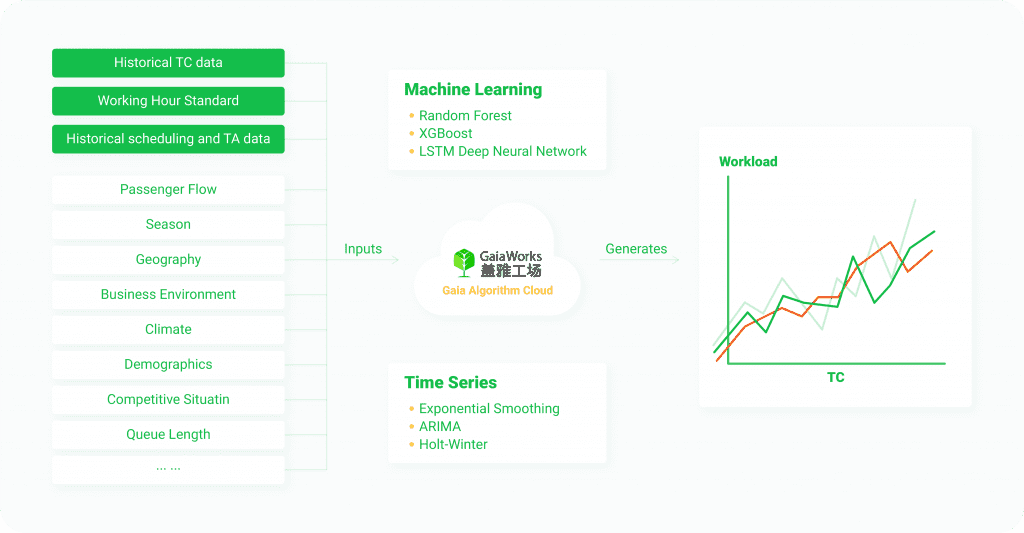
A demand-based process considers:
- expected demand by time period and location;
- operating hours and required tasks;
- labor standards or productivity assumptions;
- minimum coverage for critical roles;
- employee availability and working-time limits.
GaiaWorks Smart Scheduling can combine signals such as sales, foot traffic, promotions, order volumes, bookings, call volumes, or production plans with employee availability, skills, roles, locations, and working-time rules. The exact inputs depend on the operation. The goal is to give managers a staffing plan connected to the work that needs to be done.
The forecast sets the starting point. Managers still review unusual events and local conditions that the data may not capture.
At Swire Coca-Cola, Smart Scheduling helped coordinate labor sharing across production lines. Weekly scheduling for complex multi-line operations fell from four to six hours to 10 minutes, a reported 97% efficiency gain. The plant also increased production capacity by 2% without hiring additional staff.
A global QSR customer reduced weekly scheduling administration from eight hours to two. The process connected demand forecasts, variable labor-hour guidelines, employee availability, and scheduling rules.
If demand changes but the roster does not, the scheduling process is relying too heavily on habit.
2. Put skills, availability, and rules inside the roster
Headcount alone does not tell you whether a roster works. A shift may have enough people assigned and still lack someone who can operate a machine, serve a particular customer group, open a site, or cover a required task.
A reliable roster needs current information about:
- skills and certifications;
- employee availability;
- role and location eligibility;
- working-time limits and rest requirements;
- employee preferences where the operation can support them;
- minimum coverage for critical positions.
The scheduling logic also needs to separate requirements from preferences. A required certification or legal working-time limit may be non-negotiable. A preferred shift or reduced rest disruption can be considered when several assignments are possible.
At Swire Coca-Cola, a digital skills registry recorded technician skill levels and certifications across production lines. The scheduling process could then consider skill matching and legal hour limits while also taking rest preferences into account. This made cross-line labor sharing easier to manage.
The same approach works in other frontline environments. A retail manager needs to know whether an employee is eligible for a particular store or role. A service-center manager needs to know which agents can handle specific queues. A manufacturing planner needs to distinguish between employees who are available and employees who are qualified for the task.
Before generating a roster, ask:
- Are skills and certifications current?
- Can managers see who is available for each shift?
- Are location, role, and rest-period rules configured?
- Can the system show why an assignment is allowed or blocked?
- Can employees update availability or request changes through a tracked workflow?
If several answers are no, changing the roster template will not solve the underlying problem.
3. Make post-publication changes part of the workflow
Once a roster is published, employees request leave, demand shifts, people call in sick, and managers discover new coverage requirements. The issue is not that changes happen. The issue is when each change is handled through separate messages, calls, and spreadsheets.
A controlled process lets managers:
- view the current roster and actual attendance;
- identify the affected shift or role;
- check availability, skills, rest rules, and coverage;
- approve or reject swaps and leave requests;
- update the roster and notify affected employees;
- keep a record of who made the change and why.
Employees also need a clear way to view schedules, update availability, request leave, and submit shift swaps where company policy allows.
A 1,000+ seat service center using GaiaWorks reduced scheduling time from 340 minutes to 90 minutes. Its shift-swap rate fell by 29%, while the time required to detect and correct a staffing gap fell from 60 minutes to 10 minutes.
The improvement came from handling preferences, rest requirements, and demand changes inside the scheduling workflow. Employees could submit requests through self-service, and managers could review and approve them online. When demand changed, schedulers could update the inputs and regenerate a plan instead of starting again from zero.
System records also make scheduling decisions easier to explain. They can show how availability, skills, rest requirements, and coverage rules affected an assignment.
For practical ways to reduce the manual work around requests and approvals, see five practical changes that make employee scheduling easier.
Measure whether the roster is improving
Do not judge a scheduling process only by how quickly it creates a roster. Check whether the roster works during the shift.
Useful measures include:
- time required to create and publish a schedule;
- understaffed intervals during peak demand;
- overtime caused by coverage gaps;
- number of changes after publication;
- shift-swap frequency;
- percentage of critical shifts covered by qualified employees;
- planned hours compared with actual hours;
- manager time spent on manual corrections.
Set a baseline before changing the process. A faster roster that creates more overtime or leaves critical roles uncovered is not an improvement.
Most operations already use separate systems for employee records, payroll, sales, or production. Smart scheduling can use relevant data from those systems to build and update rosters. The exact setup depends on the organization’s workforce rules and data flows.
Frequently asked questions
What is smart scheduling?
Smart scheduling uses demand information, employee data, skills, availability, and working-time rules to recommend or generate rosters. Managers can review the result, make approved changes, and compare planned staffing with actual operations.
How do I know whether a roster problem is caused by demand or skills?
Compare the roster with actual work by time period and role. If headcount is too low during predictable peaks, the problem may be demand planning. If enough people are present but a required role remains uncovered, the problem may be skills, eligibility, or assignment rules.
Can smart scheduling handle changes after a roster is published?
It can if the system includes tracked workflows for availability changes, leave, shift swaps, absences, approvals, and rescheduling. The exact process depends on company policy and the rules configured for each workforce group.
Managers can fix a roster faster when they can see whether a gap comes from demand, skills, or a change made after publication.