
Make Employee Scheduling Easier: 5 Practical Changes
To make employee scheduling easier, reduce the manual decisions managers repeat each week. A workable process brings expected demand, employee availability, skills, working-time rules, and approved changes into one place.
Managers still handle exceptions, but they should not have to start from a blank roster whenever conditions change. The five changes below target the work that consumes the most time and creates the most rework.
Make employee scheduling easier with demand-led planning
Start with the work that needs to be done, rather than copying last week’s roster. A store may need more people during evening traffic. A factory may need additional coverage when production volume rises. A service center may need more agents during predictable call peaks.
A demand plan should account for:
- expected demand by time period and location;
- operating hours and required tasks;
- labor standards or productivity assumptions;
- minimum coverage for critical work.
GaiaWorks Smart Scheduling can use signals such as sales, foot traffic, promotions, order volumes, bookings, call volumes, or production plans to estimate labor demand. Relevant inputs may come from the employee, attendance, sales, production, or other operational systems already in use.
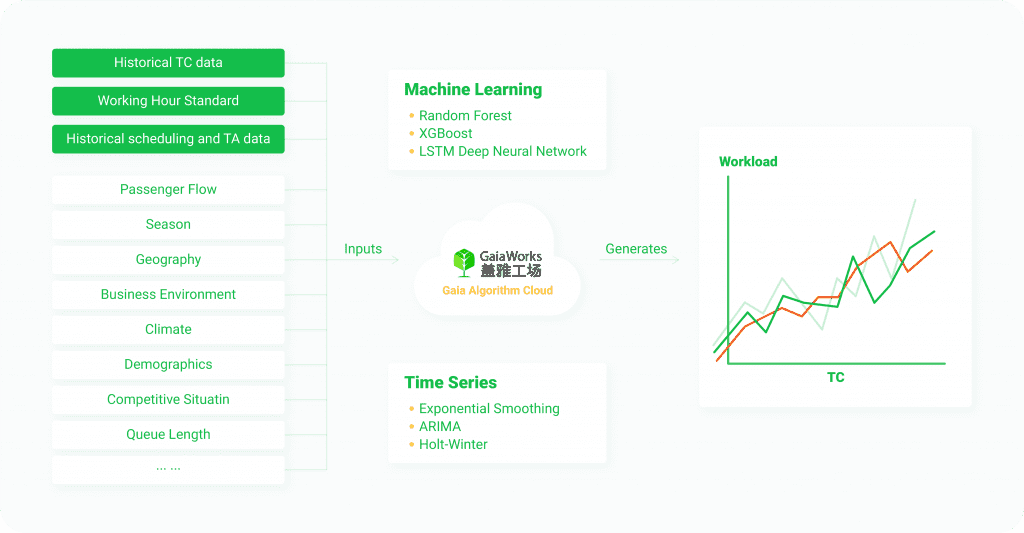
A global QSR customer reduced weekly scheduling administration from eight hours to two. The process connected demand forecasts with variable labor-hour guidelines and scheduling rules, giving managers a more practical starting point for each week.
The forecast sets the starting point. Managers still review unusual events and local conditions that the data may not capture.
For a broader checklist before you redesign the workflow, see employee scheduling best practices for frontline teams.
Keep skills and availability current
Headcount alone does not show whether a schedule will work. A shift may have enough people assigned and still lack someone who can operate a machine, open a site, serve a particular customer group, or cover a required task.
A useful workforce record includes:
- skills and certifications;
- employee availability;
- role and location eligibility;
- current employee assignments;
- minimum coverage requirements for critical positions.
The information needs regular maintenance. Expired certifications, outdated availability, and incorrect role assignments can make an otherwise complete roster unreliable.
At Swire Coca-Cola, a digital skills registry recorded technician skill levels and certifications across production lines. Smart Scheduling used that information to support labor sharing across the plant. Weekly scheduling for complex multi-line operations fell from four to six hours to 10 minutes, a reported 97% efficiency gain. Production capacity also increased by 2% without additional hires.
For any frontline team, the question is straightforward: can a manager see who is available, who is qualified, and where that person can work before assigning the shift?
Move routine requests into self-service
Managers should not have to handle every leave request, availability update, or shift swap through separate messages and phone calls. Employees need a clear way to view their schedules and submit routine requests, while managers keep approval control.
A self-service workflow can allow employees to:
- view current and upcoming shifts;
- update their availability;
- request leave;
- submit shift swaps where policy allows;
- receive notifications when an approved change affects them.
A proposed change should follow the organization’s approval process before it reaches the roster. Employees can make requests directly, and managers can review the effect on coverage before approving them.
A 1,000+ seat service center using GaiaWorks reduced scheduling time from 340 minutes to 90 minutes. Its shift-swap rate fell by 29%, while the time required to detect and correct a staffing gap fell from 60 minutes to 10 minutes.
The improvement came from moving preferences, leave requests, and swaps into a tracked workflow. Managers no longer had to rebuild the schedule from the beginning whenever one employee’s availability changed.
If the schedule keeps breaking when demand or availability changes, see how to fix roster problems at the source.
Validate working-time rules before approval
Working-time rules are easier to manage when they are checked during scheduling rather than after the roster has already been approved. Requirements may vary by country, entity, employee group, and work arrangement.
A scheduling process should let teams:
- configure overtime and rest-period rules;
- apply the rules to the correct workforce groups;
- flag potential conflicts before approval;
- show which employee, shift, or rule caused the conflict;
- record decisions when managers make an exception.
The purpose is to make a potential issue visible while there is still time to adjust the roster. It does not remove the need for HR or managers to interpret policy and handle unusual situations.
This approach also reduces repeated checking. Managers can review a proposed change with the relevant rule already attached to the shift instead of searching through separate spreadsheets or policy documents.
Set a labor target and measure the result
A schedule can meet demand and still use more labor than the operation can afford. Before generating a roster, define what the schedule needs to protect.
Possible targets include:
- keeping critical roles covered;
- reducing avoidable overtime;
- staying within a labor-hour budget;
- protecting service levels during peak periods;
- balancing work across eligible employees;
- reducing manual changes after publication.
Then compare the plan with what actually happened. Useful measures include:
- time required to create and publish a schedule;
- number of manual changes after publication;
- time spent processing leave and swap requests;
- understaffed intervals during peak demand;
- overtime caused by coverage gaps;
- percentage of critical shifts covered by qualified employees;
- planned hours compared with actual hours;
- manager time spent on manual corrections.
Set a baseline before changing the process. A faster roster that creates more overtime or leaves critical roles uncovered has moved the cost rather than reduced it.
Frequently asked questions
What is the easiest way to make employee scheduling easier?
Start by standardizing the information managers use every week. Make demand, availability, skills, working-time rules, and approved requests visible in one workflow. Then automate routine steps such as initial roster generation, conflict checks, notifications, and employee requests.
Does easier scheduling mean managers lose control?
No. A well-configured process reduces repetitive administration while leaving managers responsible for approvals, exceptions, and unusual operating conditions. Managers should be able to review the proposed roster and change it when the situation requires.
Can scheduling tools use data from existing business systems?
They can use relevant data from employee, attendance, sales, production, payroll, or other operational systems, depending on the available integrations and configuration. The data flow should be checked before implementation so that managers are working from current information.
When demand, workforce data, and approvals stay in one workflow, managers spend less time checking the same information and more time running the shift.
Request a demo to discuss your scheduling workflow.